
Sudipta Deb
Founder of Technical Potpourri, Co-Founder of Shrey Tech, Enterprise Cloud Architect
Every Data 360 projects starts with the same promise: bring all of your customer data together and put it to work. Where most projects struggle is the space between the promise and the result. Teams connect a dozen sources, build a few segments, and then wonder why their agents still give generic answers and their unified profiles look slightly wrong.
In my experience, the difference between a Data 360 implementation that delivers and one that stalls comes down to treating it as a lifecycle, not a set of features. Each stage depends on the one before it. Ger harmonization wrong and identity resolution suffers. Get Identity resolution wrong and every insight, segment and AI response built on top inherits the error.
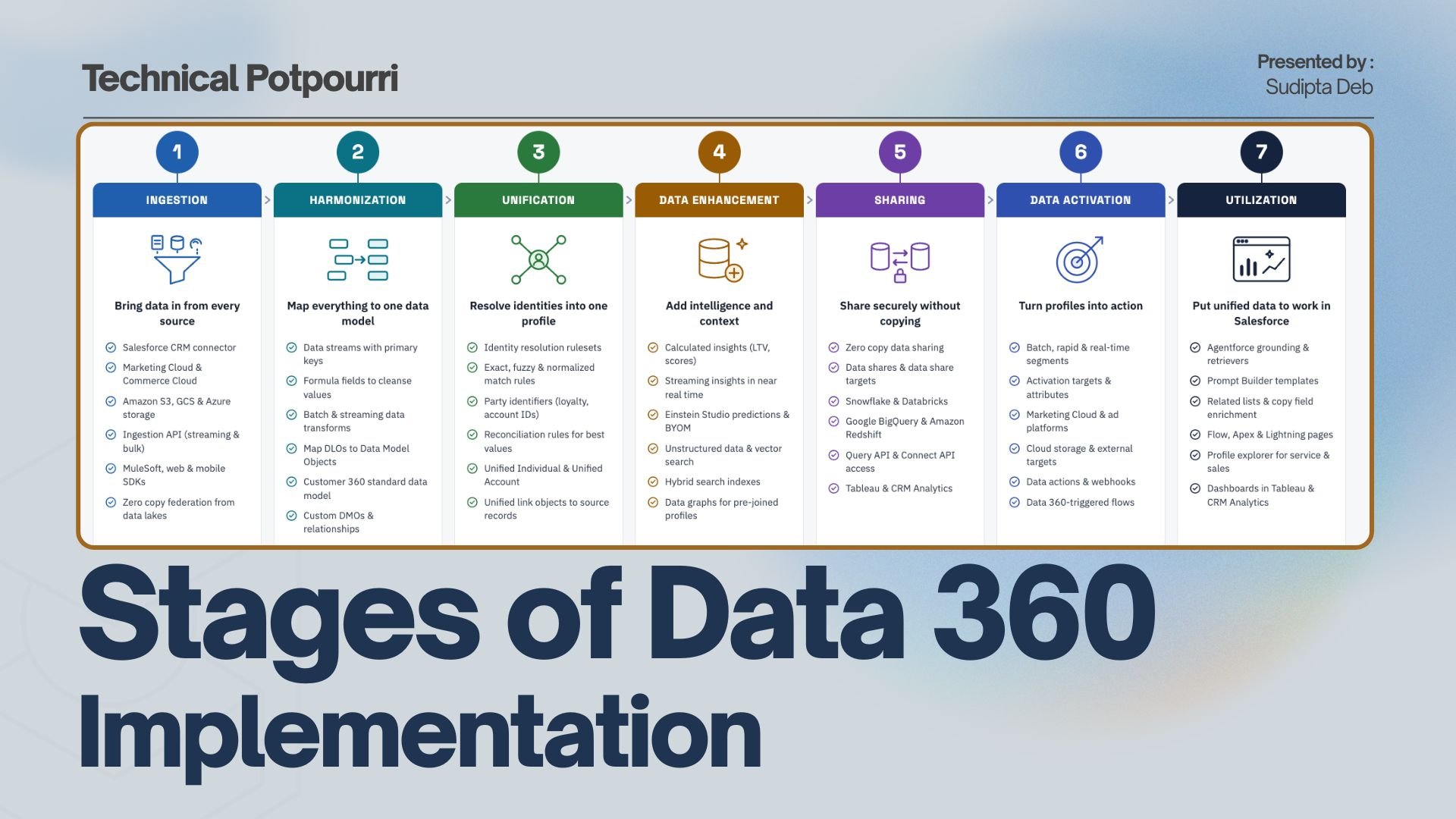
This post wals through seven stages that I use to plan and explain Data 460 implementations, from Ingestion all the way to using unified data inside Salesforce.
Stage 1: Ingestion
Ingestion is about bringing data in from every relevant source. Data 360 gives you several routes:
- native connectors for Salesforce CRM, Marketing Cloud and Commerce Cloud
- cloud storage connectors for Amazon S3, Google Cloud Storage and Azure
- the Ingestion API for streaming and bulk loads
- Mulesoft and the web and mobile SDKs for everything else
Increasingly, there is also zero copy federation. Instead of moving data out of Snowflake, Databricks, BigQuery or Redshift, Data 360 queries it where it lives.
Whichever route you choose, data lands in a Data Lake Object (DLO) through a data stream.
The decisions you make here matter more than they appear. When you create a data stream, you choose its category (Profile, Engagement or Other) and its primary key. Both are difficult to change later.
Architect's Tip: Decide ingest versus federate per source, not per project. High-volume engagement data that already lives in a lakehouse is often a strong federation candidate. Small, frequent joined reference data is usually simpler to ingest.
Stage 2: Harmonization
Raw DLOs reflect the shape of their source systems, and no two sources agree on what a customer looks like. Harmonization fixes that by mapping DLOs to Data Model Objects (DMOs), based on the Customer 360 standard data model.
Before mapping, you can clean data with formula fields on the data stream, or reshape it with batch and streaming data transforms. Where the standard model doesn't cover your user case, you extend it with custom DMLs and relationships.
This is the stage where most design effort should go, and it's often the one that gets rushed. Everything downstream depends on the Individual, Contact Point and Party Identification DMOs being mapped correctly.
Architect's Tip: map to standard DMOs wherever you reasonably can. Standard objects are what identity resolution, segmentation, and many out-of-the-box features expect. Every custom DML is something you'll need to wire up yourself later.
Stage 3: Unification
Unification turns many partial records into one profile through identity resolution. You define a ruleset made of match rules and reconciliation rules:
- Match rules decide which records belong to the same person. They can be exact, fuzzy, or normalized matches on name, email, and phone, or on party identifiers such as a loyalty ID.
- Reconciliation rules decide which value wins when sources disagree, such as most recent, most frequent, or source priority.
The result is a Unified Individual (and Unified Account for B2B), linked back to every contributing source record through unified link objects.
Architect's Tip: expect to iterate between harmonization and unification several times. Start with conservative match rules, then inspect the consolidation rate and sample unified profiles before loosening anything. Over-matching, where two different people merge into one profile, is far more damaging than under-matching.
Stage 4: Data Enhancement
With trusted profile in place, you can add intelligence on top of them:
- Calculated insights produce metrics and aggregates such as lifetime value, engagement scores, and purchase frequency.
- Streaming insights do the same in near real time.
- Einstein Studio adds predictive attributes, including models you bring from your own ML platform (BYOM).
This stage also covers unstructured data. Knowledge articles, PDFs, transcripts, and emails can be chunked and indexed in vector or hybrid search indexes. That is what makes retrieval-augmented generation possible later in the lifecycle. Data graphs pre-join a profile with its related data, so it can be retrieved quickly in real-time.
Architect's TIP: build insights around the decisions the business wants to make, not around the data you happen to have. A good test is whether an insight will appear in a segment, a prompt, or on a record page. If not, it's probably not worth mentioning.
Stage 5: sharing
Sharing is the outbound side of zero copy. Through data shares and data share targets, harmonized DMOs, unified profiles, and insights can be made available to Snowflake, Databricks, BigQuery, and Redshift without duplicating the data. Data Science and Analytics teams can then work with governed Data 360 data using the tools they already use. The Query API and Connect API serve programmatic access, and Tableau and CRM Analytics cover analytics.
It's worth separating sharing from activation. Sharing makes data available to other platforms for analysis. Activation pushes audiences and events to systems that act on them.
Stage 6: data activation
Activation turns profiles into action. You build segments (batch, rapid publish, or real time) and publish them to activation targets:
- Marketing Cloud
- Advertising Platforms
- Cloud Storage
- Other external systems
For event-driven use cases, data actions send signals to webhooks or Platform Events when a condition is met. Data 360-triggered flows let you respond to changes in data directly with Flow.
Architect's tip: define activation attributes deliberately. Sending only the fields a target actually needs keeps payloads light and reduces the risk of exposing data unnecessarily.
Stage 7: utilization
This is where the investment pays off within Salesforce itself. Unified data can surface on record pages through Data 360 related lists and copy field enrichment. Profile Explorer gives service and sales users the full customer context. Flow and Apex can query and act on Data 360 data.
Most importantly, Data 360 is the grounding layer for AI:
- Prompt Builder templates can pull in unified profile fields and insights.
- Agentforce agents use retrievers over your search indexes to answer questions from your own knowledge and customer data, rather than generic model knowledge.
An agent is only as good as the data it can reach. Every earlier stage of this lifecycle is ultimately what determines whether that agent's answer is accurate and personal.
Continuous Governance Across Every Stage
Governance isn't a final step; it runs underneath the entire lifecycle.
- Data spaces separate brands, regions, or business units.
- Permission sets control who can configure and see what.
- Consent data determines what can be activated.
- Data policies and classification protect sensitive fields.
- Auditing keeps the whole system accountable.
Designing these in from day one is far easier than retrofitting them after segments and agents are already live.
Common Pitfalls to avoid
A few patterns show up again and again in implementations that struggle:
- Treating ingestion as the milestone. Connecting sources feels like progress, but harmonization and unification are where value is actually created.
- Skipping profile validation. Reviewing sample unified profiles before activation catches problems early.
- Building insights nobody uses. Metrics that never reach a segment, prompt or record page are maintenance with no payoff.
- Leaving AI grounding until the end. If Agentforce is the goal, plan your search indexes, data graphs and retrievers early, because they shape which data you ingest and how you model it.
Wrapping up
Data 360 is powerful, but it rewards discipline. Think of it as seven connected stages: ingestion, harmonization, unification, enhancement, sharing, activation and utilization, all wrapped in continuous governance. That framing makes it easier to plan the work, explain it to stakeholders, and spot where a struggling implementation has gone wrong.
Disclaimer
This article is not endorsed by Salesforce, Google, or any other company in any way. I shared my knowledge on this topic in this blog post. Please always refer to Official Documentation for the latest information.


0 Comments